SecureAgent: Constructing Secure AI Agent Systems

The Hong Kong Polytechnic University (PolyU)
A secure multi-agent platform for end-to-end attack-defense evaluation, with pluggable MCP tools, skills, and RAG knowledge integration.

Multi-agent · MCP tools · Skills · RAG · Attack & Defense

What is SecureAgent?

AI agents are becoming a key platform for deploying LLMs in real-world applications, with technological advances enabling automation and decision-making for complex tasks. However, their integration with critical systems (e.g., automated shopping, automated finance) introduces new security risks—uncontrollable inputs, opaque logic, and dynamic environments expose them to attacks such as fraud or workflow hijacking. Companies are in urgent need of discovering vulnerabilities in agents and building a robust security framework to ensure their secure deployment. Therefore, we developed SecureAgent. SecureAgent is an open-source, LangGraph-based multi-agent security evaluation platform that performs systematic end-to-end attack-defense testing using pluggable MCP tools , Skills, and RAG knowledge integration.

Multi-Agent System Architecture

SecureAgent uses LangGraph to build a stateful multi-agent execution graph. Each step's input and output are explicitly modeled in the graph state, providing full transparency, debuggability, and control over the agent's reasoning process.

Task
Decomposer
Planning
Decision
Execute
Memory
Reflection
Retry

Pluggable LLM

Use commercial APIs or local open-source models (Ollama with Qwen, Llama, etc.). The graph depends only on an abstract LLM interface.

Configurable Nodes

Enable or disable reflection, memory, RAG, and skills via config flags. Add, merge, or remove graph nodes as needed.

Auto Retry

When execution fails or no progress is detected, the system automatically retries with reinforced instructions before giving up.

MCP Tools: Local and Cloud

In SecureAgent, all tools are provided through MCP (Model Context Protocol). The agent only sees tool names, descriptions, and parameter schemas—it does not care whether a tool runs locally or in the cloud. Switch between local and remote tool backends with a single config change.

Local MCP Server

  • Starts via stdio from mcp_server/
  • Best for local development & debugging
  • Built-in tools: search, crawling, file I/O, shell
  • Zero network dependency

Cloud MCP Service

  • Connects via SSE / HTTP transport
  • Ideal for shared enterprise tool services
  • Same agent logic, different backend
  • Switch with config.mcp settings

Built-in tools available out of the box:

Web Search
Deep Search + Content
Web Crawler
Browser Search
File Read / Write
Directory Listing
Shell Commands
Date & Time

You can add custom tools by creating new modules under mcp_server/tools/ with the @tool decorator and registering them in server.py. All tools—search engines, APIs, and automations—are simply different MCP implementations that you can freely add, remove, or replace.
Skill System

Skills are reusable, structured task templates—higher-level strategy plugins that the agent can select and execute for complex workflows. Instead of relying on ad-hoc prompts, you can codify proven procedures into Skills that the agent automatically invokes when appropriate.

Define Skill
Loader Validates
Decision Selects
Execute End-to-End

Each Skill consists of three parts:

  • Metadata — name, description, priority, tags, applicable scenarios, and allowed tools
  • Documentation — a SKILL.md file that tells the LLM when and how to use this Skill
  • Execution Logic — Python scripts and tool-calling sequences that implement the workflow

At startup, skills/loader.py scans all skill directories, validates their YAML frontmatter, and makes them available to the Decision node. You can control skill selection through whitelisting, blacklisting, and priority tuning—turning tacit knowledge into reusable, testable capability units.

RAG: Bring Your Own Knowledge

SecureAgent includes a lightweight RAG (Retrieval-Augmented Generation) pipeline that safely injects your document knowledge into the agent's decision process—without uncontrolled text concatenation into prompts.

Prepare Docs
Build FAISS Index
Online Retrieval
Context Fusion
  • Index Building — Run RAG/build_index.py to vectorize and chunk your Markdown / text documents using Ollama embeddings and FAISS
  • Smart Retrieval — During conversations, when the agent needs external knowledge, it queries the FAISS index for the most relevant document chunks
  • Controlled Injection — Retrieved context is fused with the current task and injected through well-defined interfaces into Decision nodes
  • Customizable — Replace the knowledge base, tune chunking strategies and embedding models, or control which graph nodes are allowed to use RAG

Add your technical documentation, security policies, SOPs, or any domain-specific knowledge to give the agent accurate, grounded answers.

Attack & Defense Evaluation

SecureAgent is not just another agent demo—it is a security evaluation platform designed to help you study and benchmark agent vulnerabilities in realistic environments. Test different LLMs, architectures, and tool configurations under real attack scenarios.

Attack Example: Indirect Prompt Injection

We provide crafted web pages that simulate indirect prompt injection attacks. When the agent visits these pages through its tools (web_search, web_crawler, browser_search), hidden instructions attempt to hijack the agent's behavior:

Normal Page

A standard AI introduction page with no hidden content.

View Page

Injected Page

Same content but with hidden prompt injection—check the source code!

View Page

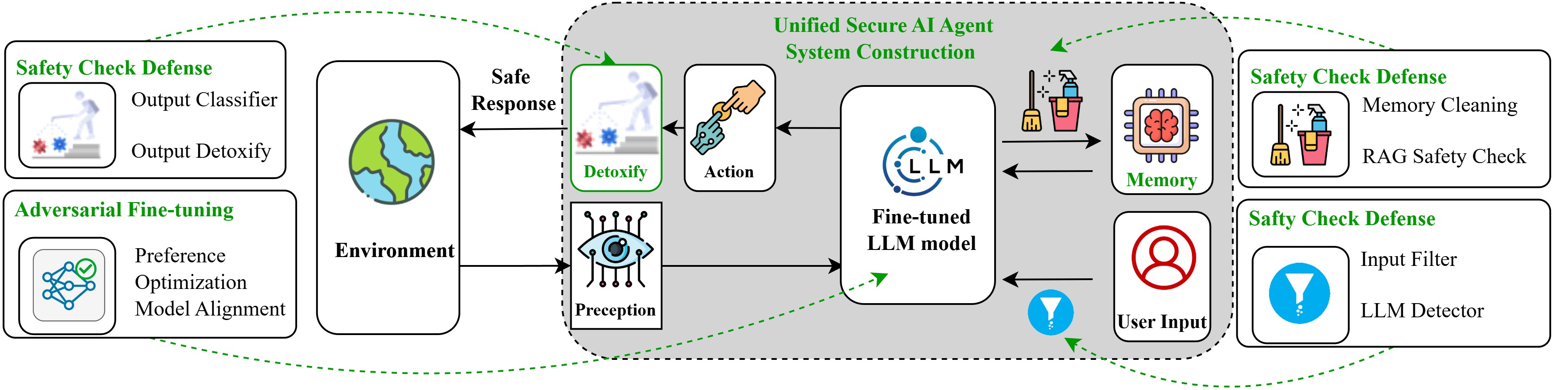
Built-in Defenses

Sandboxed Prompts

System prompts explicitly label and isolate external content, distinguishing user instructions from web page content to prevent blind instruction following.

Reflection + Progress Verification

The Reflection node cross-checks task lists, tool call logs, and execution state to verify genuine task completion—not just trusting "the model says it's done."

Controlled RAG & Skill Injection

External knowledge and skills enter through well-defined interfaces, not arbitrary text concatenation into system prompts.

The attack-and-defense effects described above can be observed in the Video Presentation section.

Design your own attack pages, modify defense rules, and use SecureAgent as a systematic security evaluation platform for benchmarking agent robustness across different configurations.

Quickstart

Get SecureAgent running in three steps. You need Python 3.10+ and an LLM endpoint (local Ollama, cloud-hosted open-source models, or a commercial API).

1. Install Dependencies

# Clone the repository
$ git clone https://github.com/BlueLotusX/SecureAgent.git
$ cd SecureAgent

# Install dependencies (use a virtualenv)
$ pip install -r requirements.txt

# Optional: browser-based search
$ pip install playwright && playwright install chromium

2. Configure

Edit config.py to set your LLM and MCP backends:

# config.py — LLMConfig
base_url = "http://127.0.0.1:11434"  # Ollama default
model = "qwen2.5"  # or any compatible model

# config.py — MCPConfig
transport = "stdio"  # "stdio" for local, "sse" for cloud

3. Launch

# Start the Web UI
$ python webui/app.py
# → Open http://127.0.0.1:7860 in your browser

# Or bind to a custom host/port
$ python webui/app.py --host 0.0.0.0 --port 8080

The Web UI will start an MCP server in the background, create a singleton SecureAgent instance, and be ready for conversations with the full multi-agent + tools + RAG + skills + defense stack.

Research Foundations

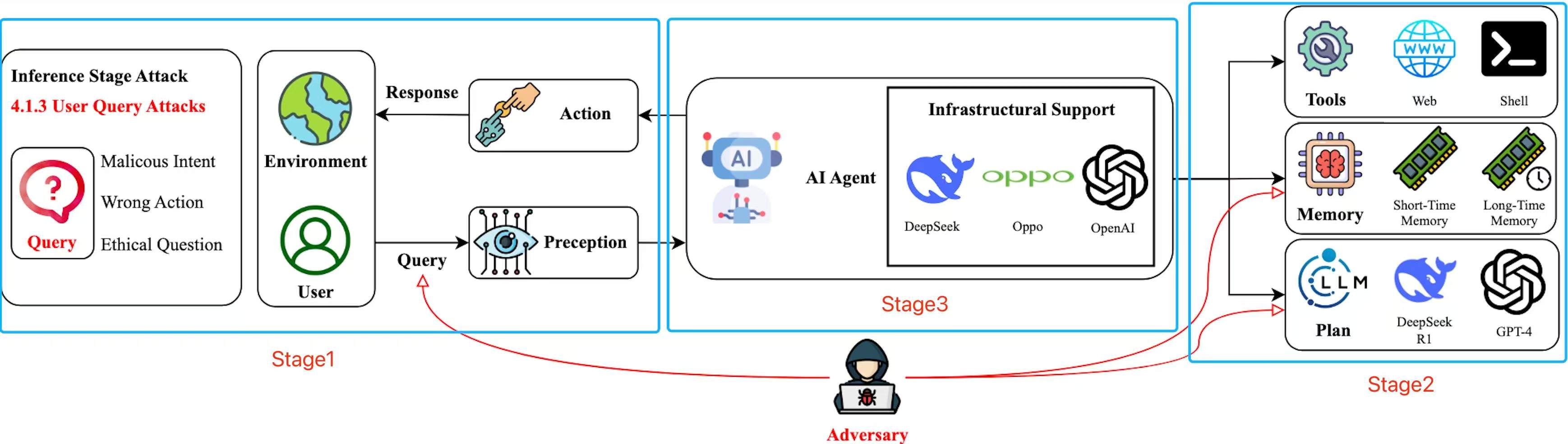
Vulnerabilities in the Environment of AI Agent

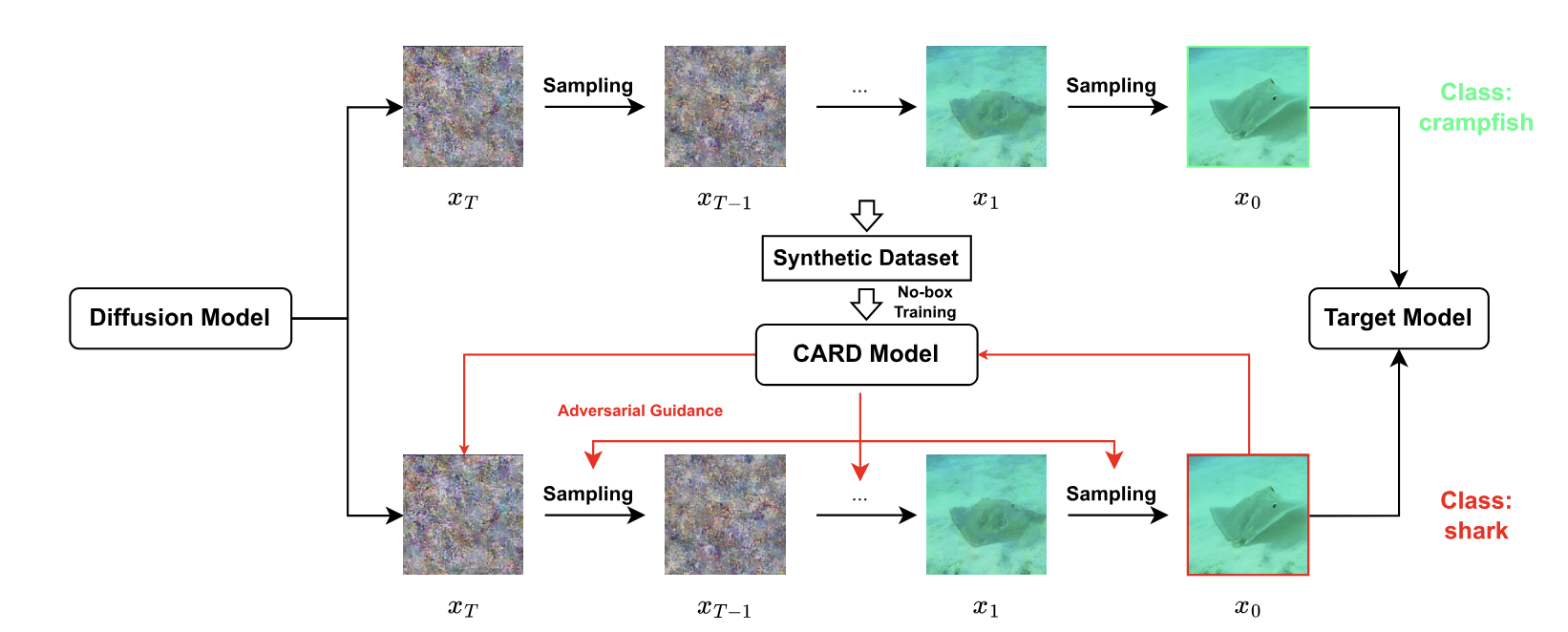
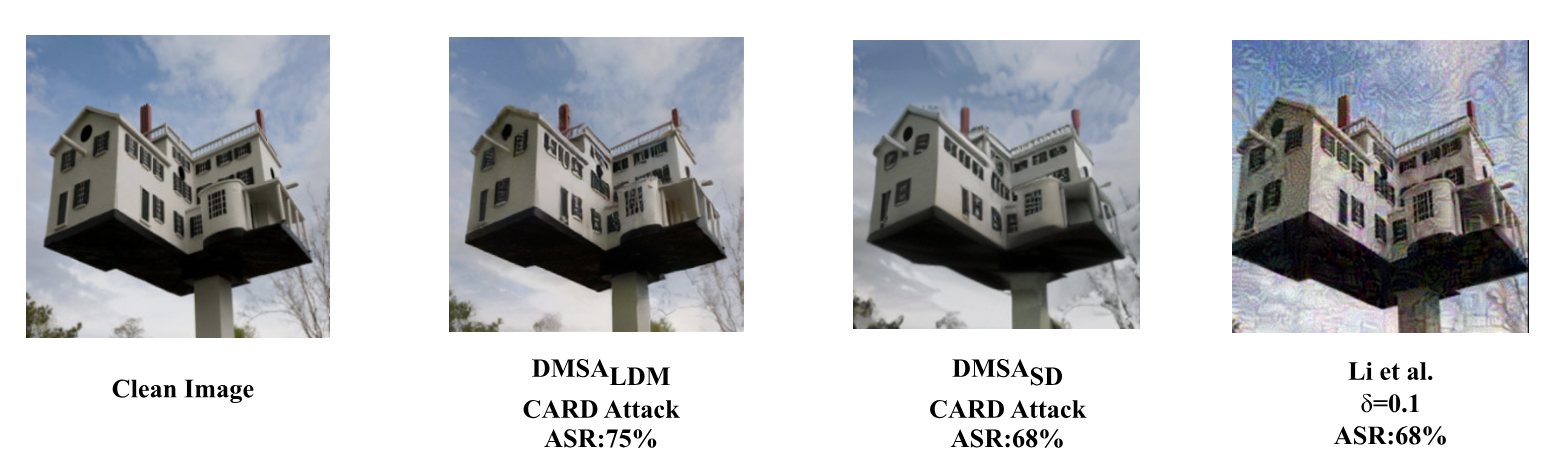
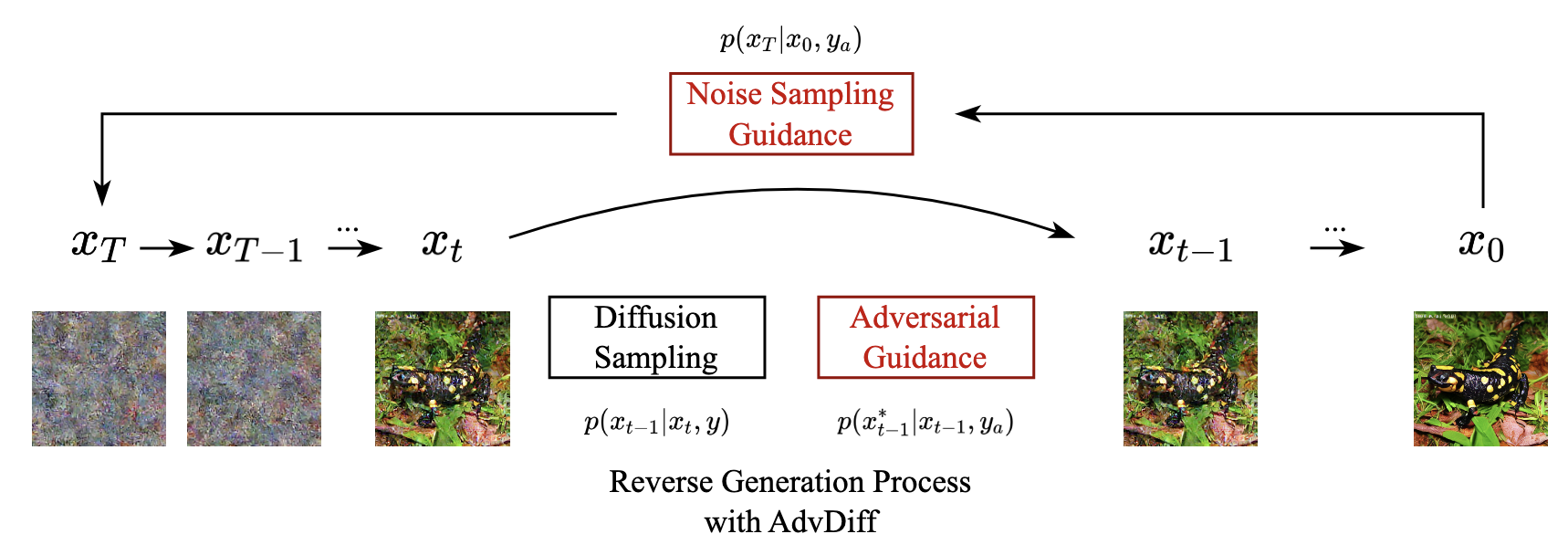
Attackers can manipulate the Agent's environment (such as website images or knowledge bases) by generating adversarial samples through diffusion models, causing the Agent to perform malicious operations. However, although diffusion models are good at generating high-quality images, their potential as adversarial tools, especially in black-box attacks (without access to the target model or training data), has not been fully studied. In this paper, we investigate the adversarial capabilities of diffusion models by conducting no-box attacks solely using data generated by diffusion models.

Attack through the Input of AI Agent

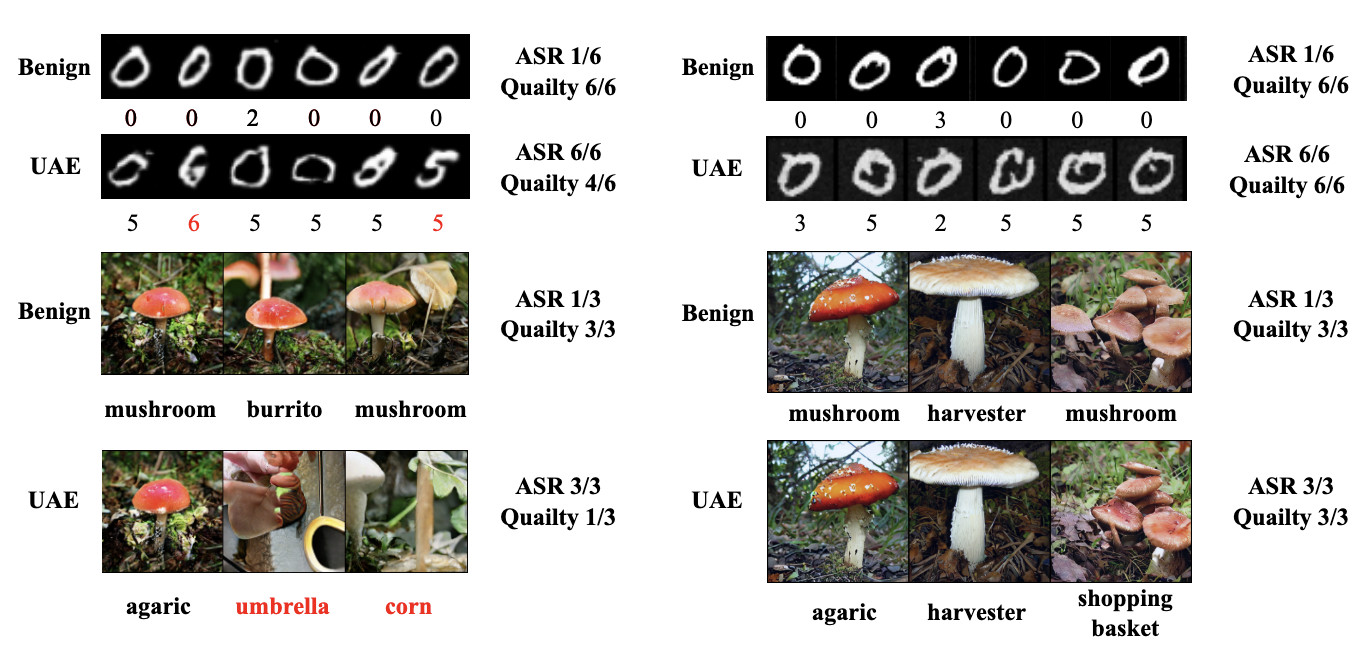
AI Agent has vulnerabilities in the input link. Attackers can use the diffusion model to generate adversarial samples and destroy the perception ability of the agent by interfering with the input layer data of the agent. So we proposed AdvDiff. Compared with traditional methods (such as PGD gradient injection), AdvDiff proposes two new adversarial guidance techniques to achieve explainable adversarial sampling in the reverse generation process of the diffusion model, which can generate more realistic and high-quality adversarial samples. Experiments show that AdvDiff's attack effect and generation quality on MNIST and ImageNet are better than existing unrestricted adversarial attack methods.

Vulnerabilities in the Cross Agent

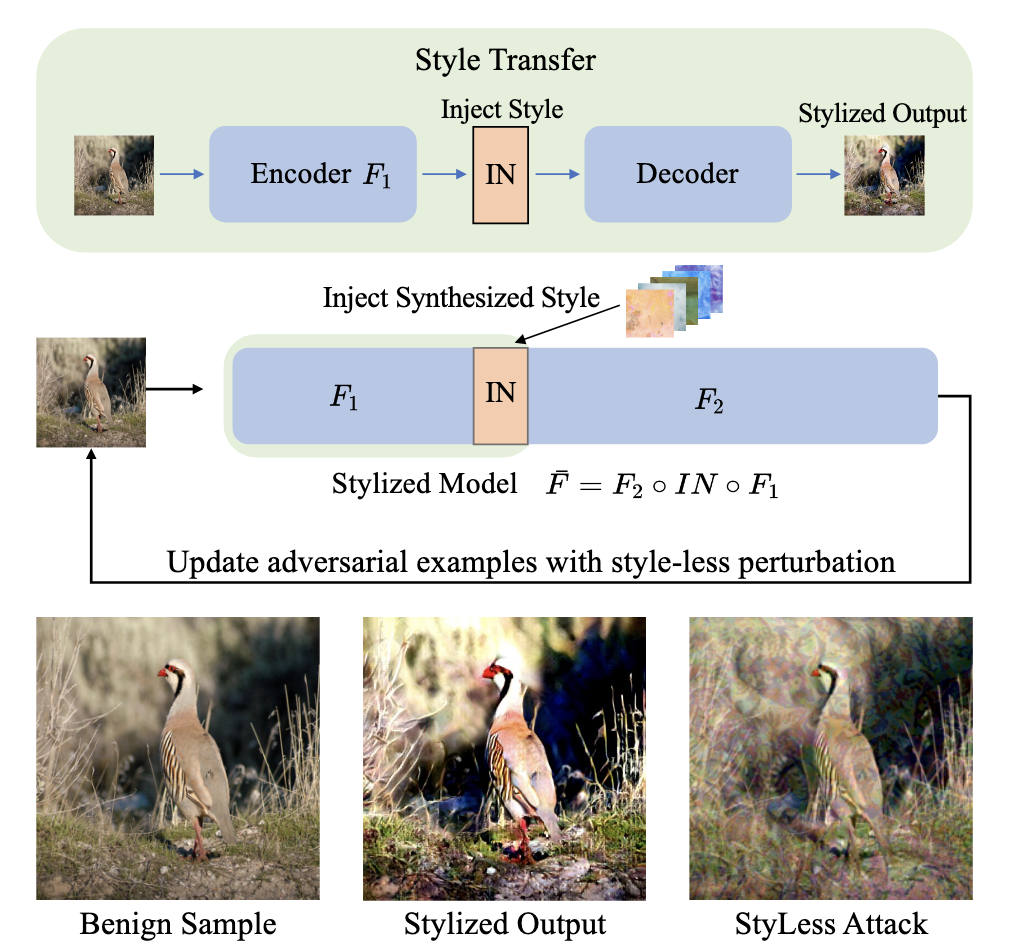
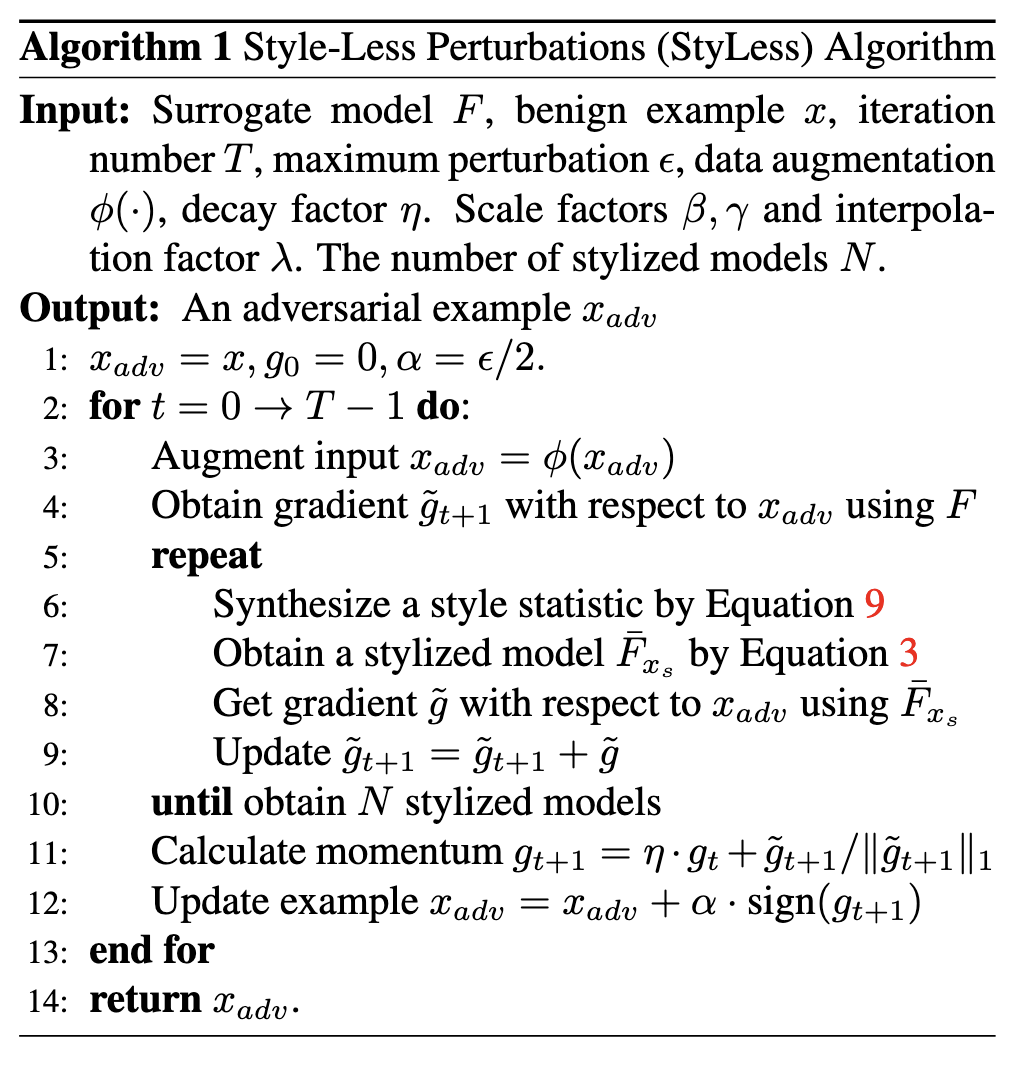
There may be vulnerabilities in different parts of a single agent, as well as between multiple agents. Attackers can generate adversarial samples with higher transfer rates to interfere with agents in various scenarios. Therefore, we propose the StyleLess method, which uses a stylized network as a proxy model and perturbs adaptive instance normalization to eliminate style features in adversarial samples, thereby significantly improving the attack transferability of adversarial samples. Experiments show that its transfer attack performance is better than existing methods, and it is compatible with a variety of attack techniques to achieve better results.

Video Presentation

The video demonstrates SecureAgent's Web UI and how different modules are used during the end-to-end workflow.

Our Team

Meet the talented individuals behind SecureAgent and get in touch with us for collaboration.

Prof. Bin Xiao

Supervisor

Supervise the whole project.

Xixi Zheng

Full-stack Developer

Responsible for the end-to-end design and implementation of the SecureAgent project, including the multi-agent system, backend services, web applications, supporting infrastructure, and the project introduction page.

Xiangyu He

Project Intro Web Developer

Responsible for the design of the project introduction website.

Dong Wang

AI Agent Security Specialist

Expert in AI Agent security.

Wenbin Zhai

AI Agent Security Specialist

Expert in AI Agent security.

Yiming Cao

AI Agent Security Specialist

Expert in AI Agent security.